Cloud infrastructure access, without cloud console access
Delegaris is a self-hosted portal for the people who need a server started, stopped or kept on after hours, but who should never hold an AWS login. They sign in with the directory account they already have; administrators decide who may touch what; the schedules your hosting team owns stay in charge.
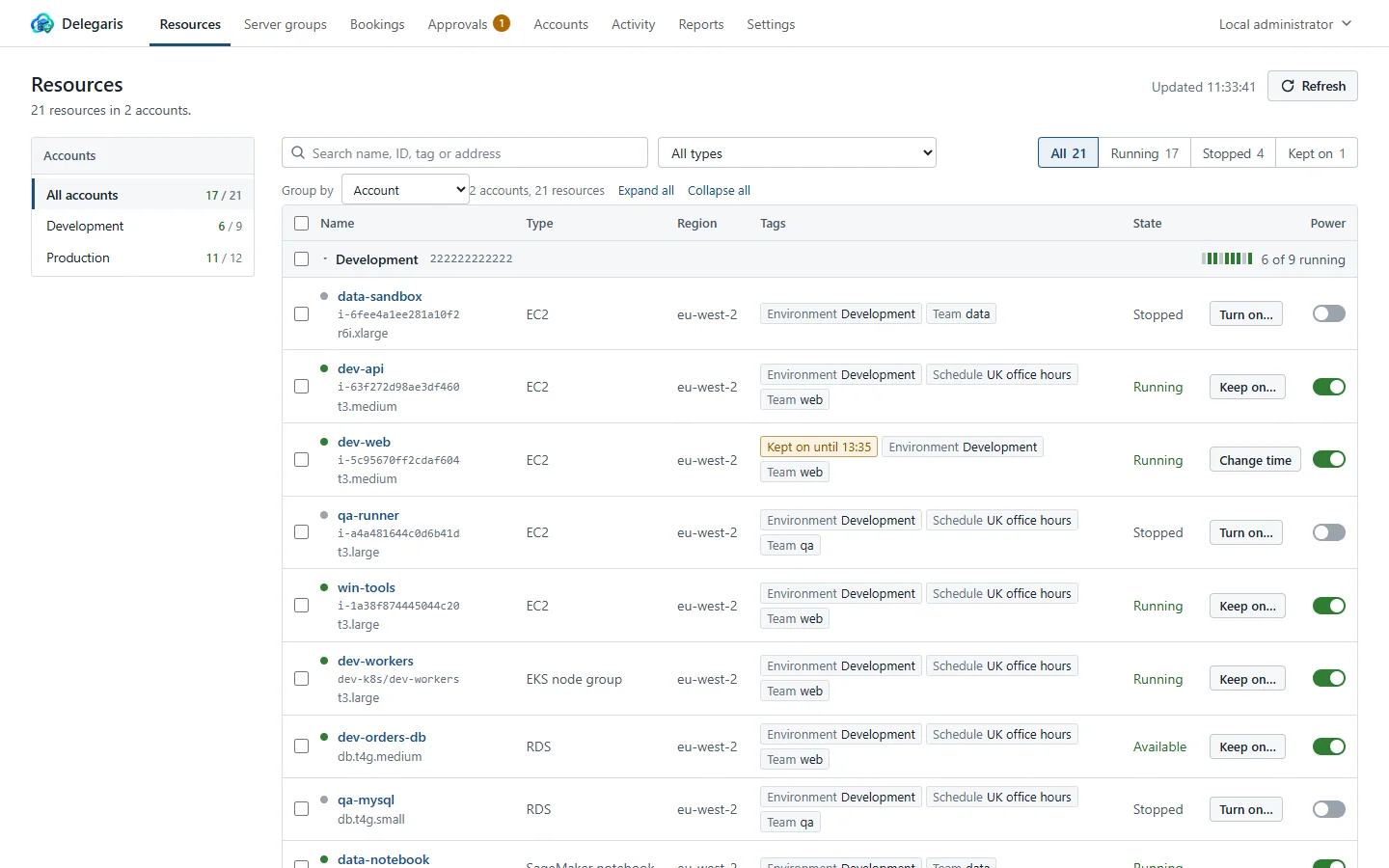
A developer's view, shown with demo data. What you see is the current release.
Two people, one problem
The hosting team owns the accounts and the schedules. Everyone else just needs the box on.
If you run the AWS estate
You have schedules that stop machines at eight and start them at eight, and a queue of requests to "just turn it on for an hour". Every one of them is a ticket, a console login you would rather not hand out, or a tag someone edits by hand and forgets.
Delegaris takes the tag off, puts it back, stops the machine when the time comes, and writes down who asked. You set the rules once.
If you just need the server
It is 6 pm, the release is not finished, and the build box goes off at eight. You open Delegaris, find the machine, choose a time, and get on with it. Fifteen minutes before, Slack reminds you; a button adds an hour.
No AWS account, no console, nothing to learn. If the machine is a delicate one, your request goes to the person who can say yes.
Start, stop, keep on
EC2 instances, RDS and Aurora databases, Auto Scaling groups, ECS, EKS and more, across every account you connect. Keep a machine on until a time; it is stopped and put back on its schedule afterwards, whoever forgets.
Your schedules stay in charge
Works with AWS Instance Scheduler, Systems Manager Quick Setup and home-built schedulers. It reads their hours, so it knows whether a machine would be on anyway.
Access rules
Grant an AD group or a person start, stop and keep-on rights on a slice of the estate: by account, region, type, tag or ID. Nobody edits tags by hand.
Approvals
Mark a rule "only with approval". Pressing Stop then sends a request; the approver decides, and the action runs the moment they say yes. Both are in the audit log.
Server groups
A database and the servers that need it start in order and stop in reverse, as one action. Keep a whole group on for the evening.
Sign in with what you have
Active Directory over LDAPS, Microsoft Entra ID, or both at once. Groups from the directory are what the rules are written against.
How it works
From an image to a working portal in an afternoon, with nothing installed on your machines.
Run it
One Docker image, or a Linux package for servers without Docker. On an EC2 instance it uses the instance's IAM role; anywhere else, paste access keys or sign in through IAM Identity Center from the Accounts page.
Connect the accounts
Each account gets a narrow role (list, start, stop, tag) from a CloudFormation template the UI fills in for you. Test the connection before you save it.
Write the rules
"The web team may keep their own machines on." "Production stops only with an ops lead's approval." From then on people help themselves, and you read the report on Monday.
That is the install. The compose file and a starting .env are in the
Docker Compose quick start,
and every setting is on the Configuration page.
Without Docker, install the Linux package with one command.
The self-hosting guide covers EC2, roles and high availability.
Nothing on your machines, nothing leaves your network
One container or Linux service that talks to AWS with a narrow role per account. No agents, no SaaS, no copy of your data anywhere else.
Free to run, nothing held back
Delegaris is free to self-host, and the free version is the whole product: every feature, any number of accounts, people and machines. There is no licence key and nothing phones home.
If you would rather someone else ran it, or you want a hand getting it into a large estate, talk to us.
- Approvals, server groups, reports and the audit log
- Active Directory and Microsoft Entra ID sign-in
- Slack, Microsoft Teams and webhook notifications
- Two or more copies behind a load balancer, with PostgreSQL
- Your organisation's name, logo and colours
Give people the button, not the console
Pull the image, connect an account, write one rule. The first keep-on takes about ten minutes from a cold start.